🔄 Last Updated: April 6, 2026
Key Takeaways
- Efficiency Boost: Low-cost AI agents for small business workflows in 2026 can automate repetitive tasks and save 10+ hours weekly.
- Platform Choice: n8n is the most cost-efficient platform due to its execution-based pricing model.
- High-Impact Use Cases: The best applications include lead qualification, customer interaction, and inventory management.
- Cost Optimization: Smart workflow design remains the biggest factor in reducing long-term AI operational costs.
Low-cost AI agents for small-business workflows in 2026 are no longer a futuristic concept—they are a competitive necessity.
For years, small business owners were promised automation, yet most tools delivered little more than glorified chatbots. They responded, but they didn’t act.
However, 2026 marks a turning point. AI has evolved from passive assistance into proactive execution through agentic workflows.
An AI chatbot waits for instructions.
An AI agent completes objectives.
This difference is massive.
An AI agent can independently plan tasks, gather data, interact with software, and deliver outcomes without constant human input. In my experience, this shift alone can replace 5–10 hours of manual work per week for a small team.
Moreover, the rise of no-code AI platforms means you don’t need developers or big budgets anymore. You just need the right stack—and a clear workflow.
Let’s break down exactly how to build these systems affordably.
The AI Stack for SMBs: Choosing the Right Platform ⚙️
AI agents don’t operate in isolation. They rely on automation platforms to connect tools, APIs, and data sources into one intelligent system.
What is an AI Automation Platform?
An automation platform acts as the “brainstem” of your AI agent. It connects apps, triggers workflows, and executes decisions based on logic and data.
For example, a lead comes in → the system analyzes it → enriches data → scores it → sends it to CRM.
All automatically.
Comparison of AI Agent Frameworks and Automation Platforms
| Platform Name | Type | Integration Breadth | Key Strengths | Primary Use Case | Pricing Model | Learning Curve |
| Zapier | Managed Platform / Visual Builder | 6,000+ to 8,000+ apps | Massive library, ease of use, and high reliability. | Non-technical teams and standard SaaS integrations. | Task-based (linear counting) | Low (10-15 mins) |
| Zapier Agents | Managed Platform (AI Assistants) | 8,000+ apps | Agent-to-agent calling and autonomous operation. | Lead enrichment and meeting productivity. | Monthly activity quota | Low (Prompt-based) |
| Make | Visual Builder / Managed Platform | 1,500+ to 3,000+ apps | Powerful visual canvas and data transformation. | Sophisticated B2B sales and marketing automations. | Operation-based (credits) | Medium (3-4 hours) |
| n8n | Framework / Self-hosted / Cloud | 400+ native (1,000+ via HTTP) | Data sovereignty and full JS/Python support. | Complex workflows and GDPR-sensitive projects. | Execution-based (fixed) | Steep (Technical) |
| CrewAI | Framework | Custom code | Role-based orchestration and strong community. | Structured multi-agent pipelines (e.g., Researcher/Writer). | Free (Open Source) | Moderate |
| LangGraph | Framework | Custom code | Maximum control and graph-based architecture. | Custom complex architectures for engineers. | Free (Open Source) | Steep (Requires LCEL) |
| Dify | Visual Builder | 50+ built-in | Visual canvas for RAG pipelines and self-hostable. | Linear RAG-powered chatbots. | Free + Paid Cloud tier | Low |
| Botpress | Visual Builder / Framework | Dozens native + any API | Multi-LLM support and built-in data tables. | Custom bots for large organizations. | Pay-as-you-go | Moderate |
| OpenAI Agent Builder | Visual Builder | MCP connectors | Tight OpenAI ecosystem integration and guardrails. | AI-first products embedded in ChatGPT. | API usage based | Fast (Beta) |
| Nebula | Managed Platform | 1,000+ apps (via Pipedream) | Time-to-production and persistent memory. | Production-ready agents without infrastructure maintenance. | Free tier / Subscription | Low-Moderate |
| Vapi / Retell AI | Voice Agent Platform | CRM / Webhooks | Low-latency voice and emotional nuance. | Inbound/Outbound sales and appointment booking. | Execution-based (per min) | Medium (Prompting) |
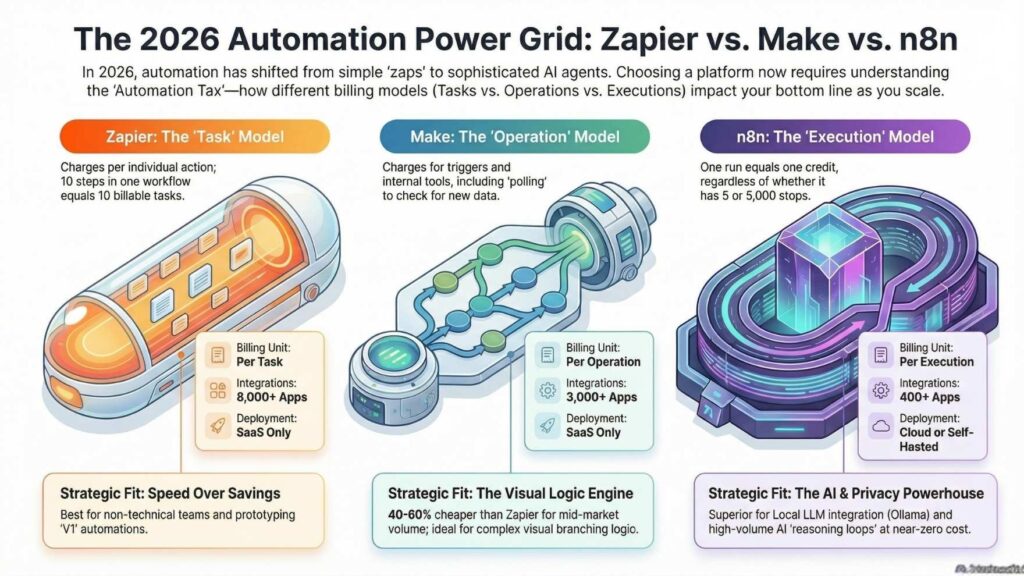
Zapier: Easy but Expensive
Zapier is the most beginner-friendly option. You can build automations in minutes.
However, pricing becomes a serious issue.
Each action counts as a task. AI agents often require multiple steps, meaning costs scale quickly. Processing 1,000 leads can easily cost hundreds of dollars.
In my experience, Zapier is great for testing ideas—but not for scaling AI agents.
Make.com: The Sweet Spot
Make.com offers powerful visual automation at a much lower cost.
It allows branching logic, API calls, and advanced workflows. For most SMBs, this is the best balance between usability and affordability.
However, watch out for “silent costs” like polling operations.
n8n: The Cost Leader
n8n completely changes the game.
Instead of charging per step, it charges per workflow execution. That means a complex AI agent with hundreds of steps still counts as a single execution.
Even better, you can self-host it for free.
If you’re serious about building low cost AI agents for small business workflows in 2026, this is the platform I recommend most.
High-Impact Use Cases for AI Agents 💡
Not every business process needs automation. The best use cases follow one rule:
Repetitive + Data-Driven = Perfect for AI Agents
Lead Qualification Automation
Lead qualification agents automatically analyze incoming leads, enrich their data, and score them based on predefined criteria. They collect details, evaluate intent, and send qualified prospects to your CRM. For example, a real estate agent can instantly filter high-value buyers from casual inquiries.
Instead of manually reviewing every inquiry, your AI agent can:
- Research company data
- Analyze customer intent
- Score leads automatically
- Send high-value prospects to your CRM
As a result, your sales team focuses only on buyers who are ready to convert.
Smart Customer Interaction
AI agents can now handle real-time conversations with context.
For instance, a service-based business can deploy an AI chat agent that:
- Asks qualifying questions
- Provides instant estimates
- Books appointments
Moreover, these agents don’t just respond—they decide based on inputs.
Inventory & Supply Chain Automation
Supply chain AI agents monitor inventory levels, analyze sales patterns, and automatically adjust stock orders. They predict demand, prevent shortages, and optimize costs. For example, an eCommerce store can avoid stockouts during peak seasons without manual intervention.
Instead of reacting to problems, your system predicts them.
In my experience, businesses using this approach reduce inventory waste significantly while improving product availability.
Step-by-Step: Build Your First AI Agent (No-Code) 🧠
Step 1: Define a Single Workflow
Start small.
Choose one repetitive process, like lead qualification or email triage.
Clarity here determines success later.
Step 2: Choose Your Platform
- Use n8n for maximum cost efficiency
- Use Make.com for visual simplicity
- Use Zapier for quick prototypes
Step 3: Connect Data Sources
Your agent needs inputs.
Typical sources include:
- Website forms
- Emails
- Google Sheets
- CRM tools
Step 4: Add an AI Model
This is the “thinking” layer.
Use:
- API-based models for flexibility
- Local models for zero cost
When I tested local models, I noticed massive savings in high-volume AI workflows.
Step 5: Create Logic Flows
Build decision-making steps:
- If lead score > 80 → send to sales
- If incomplete data → request more info
This transforms your automation into an “agent.”
Step 6: Deploy and Monitor
Once live, track:
- Execution success rates
- Cost per workflow
- Time saved
Optimization is where real ROI happens.
Cost Breakdown: Run AI Agents Under $20/Month 💰
What Does It Really Cost?
Running AI agents cheaply involves combining low-cost automation tools with efficient AI models. You pay for hosting, workflow execution, and minimal API usage. For example, a self-hosted workflow with a lightweight AI model can process thousands of tasks for under $20 monthly.
Here’s a realistic breakdown:
| Component | Cost Range | Notes |
|---|---|---|
| VPS Hosting | $5–$20/month | For self-hosted automation |
| Automation Tool | Free–$24/month | n8n or Make.com |
| AI Model API | $1–$10/month | Depends on usage |
| Local LLM | $0 | Runs on your hardware |
The Cheapest Setup (Recommended)
- n8n (self-hosted) → Free
- VPS → $5/month
- Local AI model → $0
Total: ~$5/month
Cloud Setup Alternative
- n8n Cloud → ~$20/month
- AI API → ~$5/month
Total: ~$25/month
Still cheaper than hiring a single employee.
Pro-Level Insight: The Real Cost Hack Nobody Talks About 🚀
Most guides focus on tools.
But the real cost-saving strategy is workflow design.
In my experience, poorly designed agents waste more money than expensive tools.
Here’s how to optimize:
- Minimize unnecessary steps
- Reduce API calls
- Cache repeated data
- Use conditional logic efficiently
A well-designed agent can cut costs by 60% or more.
Future-Proofing Your Business with AI Agents 🔮
The biggest advantage of low cost AI agents for small business workflows in 2026 is leverage.
You’re no longer trading time for money.
Instead, you’re building systems that work 24/7.
Businesses already using AI agents are:
- Scaling faster
- Reducing operational costs
- Improving customer experience
Meanwhile, those delaying adoption are falling behind.
This isn’t about replacing humans. It’s about amplifying what small teams can achieve.
FAQs
What are low cost AI agents for small business workflows in 2026?
Low cost AI agents are automated systems that perform business tasks independently using minimal resources and affordable tools. They combine automation platforms with AI models to handle workflows like lead qualification or customer support. In 2026, no-code tools make them accessible to non-technical users.
How much does it cost to build an AI agent for a small business?
You can build a functional AI agent for as little as $5 to $20 per month. Costs depend on hosting, automation tools, and AI usage. Self-hosted solutions with local models are the cheapest, while cloud-based setups offer convenience at slightly higher costs.
Which platform is best for building AI agents in 2026?
The best platform depends on your needs, but n8n is widely considered the most cost-effective for AI agents. It charges per execution rather than per step, making it ideal for complex workflows. Make.com is a strong alternative for visual builders.
Can I build AI agents without coding skills?
Yes, you can build AI agents without coding using no-code platforms like n8n and Make.com. These tools provide drag-and-drop interfaces and pre-built integrations. Even beginners can create powerful workflows by following structured steps.
What are the best use cases for AI agents in small businesses?
The best use cases include lead qualification, customer support automation, and inventory management. These tasks are repetitive and data-driven, making them ideal for AI agents. Automating them significantly improves efficiency and reduces operational costs.
See Also: How to Automate Malware Scanning in Google Drive Using Make.com (No Code)