If your internet has slowed down for no obvious reason, your browser keeps sending you somewhere you did not intend to go, or you just have a gut feeling something is wrong with your home network, your instincts may be right. Your router could be hacked, and you would not necessarily know it.
That is the most dangerous thing about a compromised router: it is almost entirely silent. No pop-up warning. No antivirus alert. No obvious symptoms until significant damage is already done. In April 2026, the FBI confirmed that Russian military intelligence had compromised vulnerable home and small-office routers across at least 23 U.S. states — using them to spy on traffic and steal credentials. The victims had no idea. Their devices were not exotic targets. They were everyday consumer routers sitting in living rooms across America.
The scale of the problem is staggering. A 2025 Broadband Genie survey of 3,242 internet users found that 81% have never changed their router’s administrator password and 84% have never updated their router’s firmware. Those two oversights alone leave millions of households completely exposed. Router attacks surged 67% compared to 2023, with outdated firmware found in 82% of all compromised devices.
This guide covers every warning sign of a hacked router, how to confirm your suspicion, how to fix it immediately, and how to make sure it never happens again. Let us start with what you need to check right now.
Why Attackers Target Your Router First
Your router is the most powerful device on your home network. Every single connection — your laptop, your phone, your smart TV, your baby monitor — passes through it. If an attacker controls your router, they control everything on your network, simultaneously, without touching any individual device.
This is what makes router compromise so much more dangerous than a standard malware infection. A virus on one laptop affects one laptop. A hacked router affects every device connected to it, passively and continuously, until someone discovers and removes the attacker.
Attackers gain router access through several methods. Brute-force attacks try thousands of common password combinations against your router’s admin login. Credential stuffing uses previously breached username and password pairs. Default credential exploitation relies on the fact that one in three routers still use the factory-set admin/password login. Firmware vulnerabilities allow attackers to compromise devices remotely without any password at all — TheMoon malware, active through 2025 and 2026, scans the internet for open ports on vulnerable routers and installs itself without needing a single credential.
Once inside, attackers either use your router immediately — for DNS hijacking, traffic interception, or botnet participation — or they remain completely dormant, watching and collecting. The most sophisticated state-sponsored attacks, like the Russian GRU campaign confirmed in 2026, prioritize invisibility above everything else.
10 Warning Signs Your Router Is Hacked
These signs range from unmistakable to subtle. Check every one carefully, because a hacked router often shows only one or two symptoms rather than all of them at once.
Sign 1 — Your Router Admin Password No Longer Works
This is the clearest and most urgent signal. If you navigate to your router’s admin panel (typically 192.168.0.1 or 192.168.1.1) and your password no longer works — and you have not changed it — someone else likely has. Attackers who gain router access change admin credentials immediately. This locks you out and locks them in, giving them uninterrupted access to your network configuration.
Sign 2 — Your DNS Settings Have Changed
DNS (Domain Name System) is your internet’s phone book. It translates domain names like google.com into IP addresses your device can reach. Attackers who control your router can point its DNS settings to a server they control. Every device on your network then automatically uses that poisoned DNS — routing your traffic through the attacker’s infrastructure without any visible sign.
Log into your router’s admin panel and navigate to the Internet or WAN settings section. Verify the DNS server addresses listed there against your ISP’s official DNS servers. If they do not match — and your ISP did not notify you of a change — you likely have a DNS hijacking situation. This is exactly how pharming attacks work: your router redirects you to a malicious copy of a legitimate website while everything looks normal in your browser’s address bar.
Sign 3 — Your Browser Keeps Redirecting You
Unexplained browser redirects are a direct symptom of DNS hijacking at the router level. You type bankofamerica.com and land on a convincing fake. You search for something and get redirected to an unfamiliar page before reaching your intended destination. Security certificate warnings on sites you trust regularly — especially without recent browser updates — also indicate DNS manipulation.
The key distinction: if redirects happen on every device on your network, the issue is at the router level. If it only affects one device, that device likely has its own malware infection.
Sign 4 — Unknown Devices Appear on Your Network
Log into your router admin panel and navigate to the Connected Devices, DHCP Client List, or Device List section. You will see every device currently connected — names, IP addresses, and MAC addresses. Compare this list carefully against every device in your household.
Unknown device names or MAC addresses that you cannot account for are a serious warning sign. Attackers sometimes connect directly to compromised networks. More commonly, devices you do not recognize are neighbors piggybacking your WiFi — but in either case, they represent an access control failure that needs immediate attention.
Sign 5 — Your Internet Is Unexpectedly Slow
Hackers who compromise home routers frequently use them in botnets — networks of hijacked devices coordinated to conduct distributed denial-of-service (DDoS) attacks, distribute malware, send spam, or mine cryptocurrency. All of these activities consume your bandwidth, often significantly.
If your internet has become substantially slower with no obvious explanation — you have not added new devices, your ISP reports no outages, and rebooting your modem does not help — your router may be participating in a botnet without your knowledge. 41% of smart home hacks originate from compromised routers, and cryptomining is particularly bandwidth-intensive and difficult to attribute without analyzing router traffic logs.
Sign 6 — Your Firewall Settings or Port Forwarding Has Changed
Check your router admin panel for firewall status and port forwarding rules. Attackers who gain access frequently disable the router firewall to reduce the chance of detection and add port forwarding rules that enable persistent remote access to your network.
If you see port forwarding entries you did not create, or if your firewall appears disabled when you did not disable it, treat this as a confirmed compromise. These configuration changes are deliberate and purposeful — they are not caused by firmware updates or ISP maintenance.
Sign 7 — Unfamiliar Software Appears on Multiple Devices
Malware injected through a compromised router can spread across every device on the network. If you notice new browser toolbars, fake antivirus programs, or software you did not install appearing on multiple devices simultaneously — not just one — your router is the most likely source rather than an individual device infection.
This pattern is particularly telling. Malware reaching multiple devices through their shared router connection follows the same network path. Consequently, the timing of appearance tends to be similar across affected devices, and the software installed tends to be identical or from the same campaign.
Sign 8 — Session Hijacking Symptoms
If you find yourself logged out of websites without logging out yourself, or if you receive notifications that your accounts were accessed from unfamiliar devices or locations, your network session data may be compromised. A hacked router sitting between you and every website you visit can intercept session tokens — the small pieces of data that keep you logged in — and replay them from a different location.
This is closely related to the man-in-the-middle attack capability that a compromised router provides. Understanding how data protection fails at the network level helps explain why session hijacking through router compromise is so difficult to detect through normal account security monitoring alone.
Sign 9 — Fake Security Warnings and Excessive Pop-Ups
Router-level DNS manipulation can inject content into web pages you visit, including fake security warnings, pop-ups urging you to download “emergency” security software, or alerts claiming your device is infected. These fake alerts are designed to provoke panicked clicks that download real malware.
The distinguishing feature: these pop-ups appear across all browsers and all devices on your network simultaneously, not just on one browser or one machine. If every device in your home suddenly starts displaying the same type of security warning, the source is almost certainly your router rather than individual device infections.
Sign 10 — Your ISP Contacts You About Suspicious Traffic
Internet service providers monitor network traffic for patterns consistent with malware, botnet activity, DDoS participation, and spam distribution. If your ISP sends you a warning about unusual outbound traffic from your connection — or if your connection gets throttled or temporarily suspended for suspicious activity — take it seriously. Your router may already be part of a criminal infrastructure you know nothing about.
The Signs at a Glance: Quick Reference
| Warning Sign | Likely Attack Type | Urgency Level |
|---|---|---|
| Admin password doesn’t work | Credential takeover | Critical — act immediately |
| DNS settings changed | DNS hijacking / pharming | Critical — act immediately |
| Browser redirects on all devices | DNS hijacking | High |
| Unknown devices on network | Unauthorized access | High |
| Unexplained slow speeds | Botnet / cryptomining | Medium-High |
| Firewall disabled or port forwarding added | Backdoor installation | Critical |
| New software on multiple devices | Malware distribution | High |
| Unexpected account logouts | Session hijacking / MitM | High |
| Fake security pop-ups everywhere | DNS injection | Medium-High |
| ISP suspicious traffic warning | Botnet / spam relay | High |
How to Confirm Your Router Is Hacked
Suspecting compromise is different from confirming it. Before you reset everything, take these verification steps to understand exactly what you are dealing with.
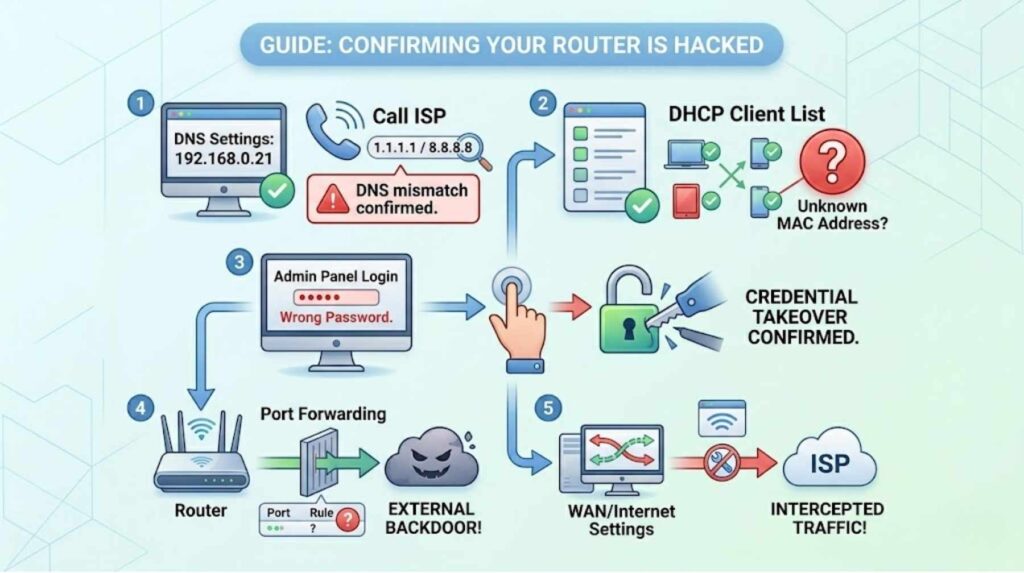
Step 1 — Check DNS settings. Log into your router admin panel and note the DNS server IP addresses listed. Call your ISP or check their website for the official DNS addresses assigned to your account. Any mismatch is a confirmed DNS hijacking indicator. As a quick test, temporarily change your DNS to Cloudflare’s 1.1.1.1 or Google’s 8.8.8.8. If your browser redirects and suspicious pop-ups disappear, you have confirmed DNS manipulation at the router level.
Step 2 — Audit connected devices. Access your DHCP client list and cross-reference every entry against devices you own. Unknown MAC addresses warrant immediate attention — you can look up any MAC address prefix online to identify the manufacturer, which often reveals what type of device it is.
Step 3 — Check your admin login. Attempt to log into your router admin panel with your credentials. Failure to log in despite entering the correct password confirms credential takeover.
Step 4 — Review port forwarding rules. Navigate to the port forwarding section of your router settings. Rules pointing to external IP addresses that you did not create indicate a backdoor has been installed.
Step 5 — Check your WAN/internet settings. Look for any unfamiliar IP addresses or unusual configurations in the Wide Area Network settings section. Attackers sometimes modify WAN settings to intercept outbound traffic before it reaches your ISP.
What to Do If Your Router Is Hacked: A Step-by-Step Fix
Once you confirm a compromise, act quickly and methodically. Speed matters — every minute of continued attacker access is additional data exposure.
Step 1 — Disconnect from the internet immediately. Unplug the cable connecting your router to your modem. This cuts the attacker’s remote access and halts ongoing data collection. It does not fix anything yet, but it stops the bleeding while you work.
Step 2 — Perform a factory reset. Locate the physical reset button on your router — usually a small pinhole on the back or bottom. Press and hold it for at least 10 seconds with a pin or paperclip. This wipes all settings including any attacker-installed configurations and returns the device to manufacturer defaults. Note: TheMoon malware and similar persistent threats are designed to survive soft resets. Use the physical hardware reset button, not the software reset option in your admin panel.
Step 3 — Update your firmware immediately. Before reconnecting to the internet, check your router manufacturer’s website for the latest firmware version for your specific model. Upload it directly through the admin panel. Outdated firmware is present in 82% of compromised routers — patching it closes the vulnerability that allowed the initial compromise.
Step 4 — Change all credentials. Set a new admin username and password using a strong, unique combination — at least 16 characters, never a dictionary word, never the same as any other account. Change your WiFi network password as well. Both changes must happen before you reconnect to the internet.
Step 5 — Enable WPA3 encryption. If your router supports it, switch from WPA2 to WPA3. WPA3 reduces brute-force attack success rates by 94% compared to WPA2, according to 2025 security benchmark data. Additionally, disable WPS (WiFi Protected Setup), which has known vulnerabilities that allow attackers to bypass your WiFi password entirely.
Step 6 — Disable remote management and UPnP. Remote management allows your router to be administered over the internet — useful for ISP technicians but a persistent security risk for everyone else. Disable it. UPnP (Universal Plug and Play) automatically opens ports for applications and has been implicated in 78% of IoT botnet infections reviewed in 2025 security audits. Disable it unless you have a specific, known need for it.
Step 7 — Scan every device on your network. Run security scans on every device that was connected during the compromise period. A hacked router can push malware to connected devices, so cleaning the router without auditing the devices it served leaves you exposed. Understanding how endpoint detection tools stop data breaches helps you choose the right scanning tool for each device type.
Step 8 — Change passwords for important accounts. Any credentials entered through your network while the router was compromised should be considered stolen. Prioritize banking, email, and work accounts. Enable multi-factor authentication everywhere it is available — hardware-based FIDO2 keys are the most resistant option.
How to Keep Your Router Secure Going Forward
Fixing a hacked router is straightforward. Keeping it secure requires consistent habits, not one-time actions.
Enable automatic firmware updates if your router supports them. Many modern routers from manufacturers like Asus, Netgear, and TP-Link now push firmware updates automatically — turn this feature on and verify it is working. If your router is over five years old and no longer receives firmware updates from the manufacturer, replace it. The FBI explicitly recommends replacing end-of-life routers, and older models running unpatched firmware represent a permanent, unresolvable vulnerability.
Create a guest network for smart home devices, IoT gadgets, visitors, and gaming consoles. This segments those devices away from your primary network where sensitive data — banking, work, personal communications — flows. 41% of smart home hacks originate from compromised IoT devices that share a network with more sensitive computers and phones. Isolation prevents lateral movement even if one device is compromised.
Review your connected devices list monthly. Set a calendar reminder. New devices appearing without your knowledge are the earliest possible warning sign, and catching them quickly dramatically limits exposure.
Building strong online safety habits that extend to your home network — not just your browser behavior — is foundational. Similarly, understanding how to protect your home computer from cyber threats and your home router as a unified security posture is the right mental model. They are not separate problems.
AI-powered cybersecurity tools designed for home users and small businesses now offer continuous network monitoring at consumer price points — some even integrate directly with home router brands to detect anomalous traffic patterns before they escalate into full compromises.
If you suspect a sophisticated or persistent compromise, or if your router has been involved in a botnet and you are concerned about legal exposure or ongoing data theft, report the incident to the FBI’s Internet Crime Complaint Center at ic3.gov. Additionally, CISA’s home network security guidance provides authoritative checklists for both incident response and ongoing protection that apply directly to router security.
For those managing remote desktop or SSH access through their home network, securing the router is the prerequisite step — all the application-layer security in the world fails if the network layer beneath it is compromised.
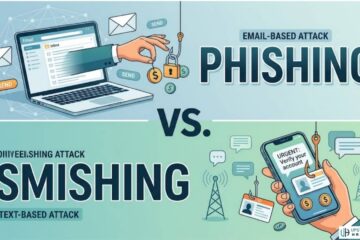
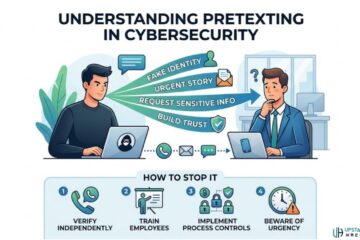
Finally, understand that social engineering attacks are one of the most common router entry points that people overlook. Attackers posing as ISP technicians or router support agents call homeowners and talk them through “troubleshooting steps” that actually disable security features or reveal admin credentials. Recognizing phishing and pretexting tactics protects your router just as much as your inbox. Baiting attacks that deliver malware via USB devices found in public places can also introduce router-targeting payloads once plugged into a connected computer.
Understanding threat intelligence patterns helps you stay ahead of emerging router attack campaigns — new botnets, firmware exploit disclosures, and active nation-state campaigns targeting consumer devices are all tracked by threat intelligence platforms that surface early warnings before attacks become widespread.
Frequently Asked Questions

How do I know if my router is hacked right now?
The fastest check is a two-step test. First, log into your router’s admin panel (usually at 192.168.0.1 or 192.168.1.1) using your admin credentials. If your password no longer works, you may have been locked out by an attacker. Second, navigate to the DNS settings in your router’s WAN or Internet section. Compare those IP addresses against your ISP’s official DNS servers. Any mismatch — especially to unfamiliar IP addresses — indicates DNS hijacking. If either test fails, disconnect from the internet and perform a factory reset before reconnecting.
What is DNS hijacking and why is it dangerous?
DNS hijacking occurs when an attacker changes your router’s DNS settings to route your internet traffic through a server they control. Because every device on your network uses the router for DNS lookups, a single compromised router poisoning affects your laptop, phone, tablet, and smart TV simultaneously. The attacker’s DNS server silently redirects specific domain lookups — your bank, your email provider, your employer’s VPN — to convincing fake sites that capture your credentials. The Russian GRU campaign confirmed by the FBI in 2026 used exactly this method, compromising routers across 23 U.S. states and capturing credentials from users who had no visible warning anything was wrong.
Can I fix a hacked router without replacing it?
Yes, in most cases. A full factory reset — using the physical hardware button, not the software option — wipes attacker-installed configurations. Follow the reset with an immediate firmware update, new admin credentials, enabling WPA3 encryption, and disabling remote management and UPnP. However, if your router model is out of support and no longer receives firmware updates from the manufacturer, replace it. Running an end-of-life router on a patched-and-reset basis still leaves you permanently vulnerable to known, unpatched firmware exploits that attackers actively target.
How do attackers hack routers without knowing my password?
Many routers have known firmware vulnerabilities that allow remote code execution without any authentication. TheMoon malware scans the internet for open ports on vulnerable routers and installs itself without needing a password at all. Additionally, many routers still run on factory-default credentials that are publicly documented — admin/admin, admin/password, or model-specific defaults listed on manufacturer websites. Credential stuffing uses previously breached username and password pairs, and brute-force tools automate millions of login attempts against router admin interfaces exposed to the internet. This is why disabling remote management is so important — it removes the attack surface for credential-based attacks entirely.
Should I replace my router after it has been hacked?
Not necessarily — but consider replacing it if your router model is older than five years, if the manufacturer no longer issues firmware updates for it, or if you cannot confirm a complete factory reset cleaned a persistent malware infection. Some advanced malware, like the Condi botnet variant, deletes critical system binaries and is designed to survive resets. If you have attempted a factory reset and signs of compromise reappear, replacement is the cleanest solution. When replacing, choose a current model that supports WPA3 encryption, automatic firmware updates, and network segmentation through a dedicated guest network. These features dramatically reduce your exposure going forward.