Cybersecurity for freelancers in 2026 is not optional. It is the difference between keeping your clients, your income, and your reputation — and losing all three in a single afternoon.
The freelance economy now represents 48% of the global workforce operating remotely, according to 2025 data. Every one of those independent workers operates without an IT department, without enterprise security tools, and without a security operations center watching their network. They are, from an attacker’s perspective, the ideal target: high-value access to multiple clients, unprotected home networks, personal devices handling sensitive business data, and zero incident response capability when something goes wrong.
The threat statistics are sobering. Phishing accounts for 43% of initial breach attempts in remote work environments. Unpatched personal devices drive 22% of endpoint vulnerabilities exploited in remote settings. 92% of IT professionals report that remote and hybrid work has materially increased cybersecurity threats in 2025. And with 70% of successful data breaches starting at endpoint devices like laptops, desktops, and mobile phones, the freelancer’s personal device is precisely the attack surface that attackers have learned to target.
Here is what every freelancer needs to know, implement, and maintain in 2026 — without enterprise tools or a dedicated security budget.
Why Freelancers Are Uniquely Vulnerable in 2026
Freelancers face a cybersecurity paradox that full-time employees do not. You handle data that is valuable enough to justify targeting — client financial records, proprietary business information, personal identifiable information, unreleased creative work — but you operate without the institutional security controls that protect corporate employees handling the same data.
That gap is exactly what attackers exploit. A freelancer who has contracts with three mid-sized businesses effectively represents three separate corporate attack surfaces — all accessible through a single home network, a single laptop, and a single set of login credentials. Compromising a freelancer does not just harm the freelancer. It harms every client whose data passes through that freelancer’s devices and accounts.
Furthermore, 72% of business owners are concerned about cybersecurity risks arising specifically from hybrid and remote work relationships. Many enterprises now conduct vendor security assessments before awarding contracts. A freelancer who cannot demonstrate basic security hygiene is increasingly losing work to those who can. Cybersecurity is becoming a competitive differentiator in the freelance market, not just a protective measure.
Additionally, the legal exposure is real. Depending on the data you handle, a breach may trigger notification obligations under GDPR, HIPAA, CCPA, or state-level data protection laws. A freelance graphic designer handling healthcare client materials, or a freelance developer with access to consumer databases, carries genuine regulatory risk. The consequences extend well beyond losing a client contract.
The Top Cyber Threats Freelancers Face in 2026
Understanding which threats specifically target independent workers helps you prioritize your defenses correctly.
Phishing remains the single most prevalent initial attack vector for remote workers, accounting for 43% of initial breach attempts in 2025 remote environments. Freelancers are particularly vulnerable because they routinely receive emails from new contacts, project invitations from unfamiliar platforms, invoice requests, and contract documents — precisely the lures that phishing campaigns use. Recognizing how phishing emails are constructed and how social engineering attacks manipulate trust is foundational for any independent worker.
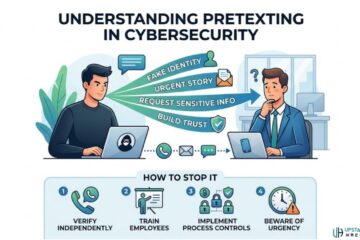
Vishing and pretexting target freelancers who manage their own client relationships. An attacker posing as a new client, a platform support agent, or a payment processor can socially engineer a freelancer into revealing credentials, authorizing transactions, or granting remote access. Understanding how vishing attacks work and what pretexting looks like in practice protects against the human manipulation layer that technical controls cannot block.
Credential stuffing and account takeover hit freelancers who rely on multiple platforms — Upwork, Fiverr, Toptal, Slack, Notion, Figma, GitHub — often with reused passwords across accounts. Stolen credentials from any one of these platforms fuel automated attacks against every other platform where the same password was used. Credential abuse drove 22% of all data breaches in 2025, making password hygiene a non-negotiable baseline.
Ransomware increasingly targets small operators and independent workers, not just enterprises. Cybercriminals recognize that a freelancer who loses access to their entire project portfolio and client files has immediate financial motivation to pay quickly and quietly. Ransomware appeared in 44% of all data breaches in 2025 — and small operators disproportionately pay because they lack the backup and recovery infrastructure that makes ransomware less effective against larger organizations.
Insecure home networks and public WiFi represent the infrastructure risk that office-based employees never face. Misconfigured VPNs drove 14% of data leaks among remote workers in 2025. Unprotected home routers — where 81% of users have never changed the default admin password — create persistent network-level exposure for everything connected to them.
The Freelancer Cybersecurity Toolkit: What You Actually Need in 2026
The good news: protecting yourself as a freelancer does not require enterprise spending. The following toolkit addresses every major threat vector at a combined cost of under $200 per year — less than the revenue loss from a single lost client relationship.
| Security Tool | Purpose | Recommended Options | Approx. Cost |
|---|---|---|---|
| Password Manager | Unique passwords for every account | Bitwarden, 1Password, Dashlane | $0–$36/yr |
| Authenticator App (MFA) | Phishing-resistant second factor | Aegis (Android), Raivo (iOS) | Free |
| VPN | Encrypt traffic on untrusted networks | Mullvad, ProtonVPN, NordVPN | $48–$100/yr |
| Endpoint Security | Detect malware, ransomware, keyloggers | Malwarebytes Premium, Bitdefender | $30–$45/yr |
| Encrypted Cloud Backup | Ransomware recovery, business continuity | Backblaze, Proton Drive | $0–$99/yr |
| Secure Email | Protect client communications | ProtonMail, Tutanota | $0–$48/yr |
| Encrypted File Sharing | Safe client deliverable transfer | Tresorit, ProtonDrive | $0–$120/yr |
| DNS Filtering | Block malicious sites before loading | Cloudflare 1.1.1.1, NextDNS | Free–$20/yr |
This is not an exhaustive enterprise stack. It is a lean, practical toolkit specifically matched to the threat profile of an independent worker. Every item addresses a real, documented attack vector. None requires technical expertise to deploy.
Step 1 — Lock Down Your Identity and Access
Identity is your first and most critical attack surface. As a freelancer, every platform account you hold represents potential access to client work, communications, and financial data.
Deploy a password manager immediately. Bitwarden offers a fully-featured free tier. Every account you hold — client platforms, communication tools, cloud storage, financial services — must have a unique, randomly generated password that you do not know from memory. This single action eliminates your exposure to credential stuffing, which drove 22% of all 2025 breaches.
Enable multi-factor authentication on every account. Use an authenticator app — not SMS — for every platform that supports it. SMS-based codes are vulnerable to SIM-swapping attacks that specifically target self-employed individuals who manage their own phone accounts. An authenticator app generates codes locally on your device, making them unavailable to an attacker who does not physically possess your phone. Prioritize enabling MFA on: your primary email account (reset access for every other account), your accounting and payment platforms, your freelance marketplace accounts, and any cloud storage holding client data.
Audit your existing accounts for breached credentials. Check every email address you use at haveibeenpwned.com. If any of your credentials appear in known breach databases, change those passwords immediately — and change them everywhere you used the same password. This is a direct expression of protecting yourself from identity theft: your freelance identity is your business, and a compromised account can end a client relationship overnight.
Step 2 — Secure Your Devices
Your laptop is your office, your filing cabinet, and your communication hub. Its security determines the security of everything you do professionally.
Enable full-disk encryption. On Windows, enable BitLocker (Settings → System → BitLocker). On macOS, enable FileVault (System Preferences → Security & Privacy → FileVault). Full-disk encryption ensures that if your laptop is stolen — in a coffee shop, on public transport, at a coworking space — the data on it is completely inaccessible to whoever took it. This is a zero-cost protection that most freelancers have never activated.
Keep your operating system and all software patched. Enable automatic updates for your OS, browser, and every application that contacts the internet. Unpatched personal devices drove 22% of endpoint vulnerabilities exploited in 2025 remote work environments. Every delayed update is an open invitation to exploit kit delivery, browser-based attacks, and watering hole attack payloads that operate through browser vulnerabilities.
Install endpoint security with real-time protection and behavioral detection. Malwarebytes Premium achieved 100% detection rates in 2025 stalkerware and malware testing. Bitdefender and ESET offer comparable protection with minimal performance impact. Check for keyloggers on your PC regularly — freelancers who type passwords, client data, and financial information constantly are high-value targets for keystroke capture malware. Run full scans weekly, not just on-access scans.
Lock your screen every time you step away. Set automatic screen lock to activate after two minutes of inactivity. On Windows: Win+L. On macOS: Command+Control+Q. This is especially critical in coworking spaces, cafés, and any shared environment where a thirty-second distraction is enough for someone to access your open session.
Step 3 — Secure Your Network
Your home network is the foundation of your entire freelance operation. Everything you do professionally passes through it.
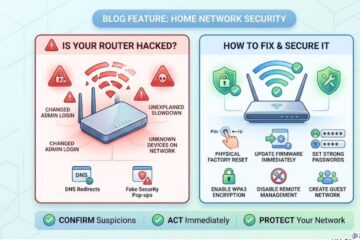
Check and harden your home router. Log into your router’s admin panel and verify: the admin password has been changed from the default, firmware is fully updated, WPA3 encryption is enabled (or WPA2 minimum), and remote management is disabled. An insecure router exposes every device on your network simultaneously. Understanding all the signs your router may already be compromised — including DNS settings changes and unknown connected devices — helps you catch infections before they escalate into client data breaches.
Create a dedicated work network. Your smart TV, gaming console, personal phone, and IoT devices should connect to a guest network, physically separated from your work laptop. This segmentation means that a compromised smart device cannot reach your work machine through the local network. Most modern routers include guest network functionality — activating it takes under five minutes and provides genuine security value.
Use a reputable VPN whenever you work outside your home. Coworking spaces, hotel WiFi, coffee shop hotspots — all present man-in-the-middle attack risk for unencrypted traffic. A VPN encrypts all traffic between your device and the VPN server, preventing local network eavesdropping. Misconfigured VPNs caused 14% of remote work data leaks in 2025 — choose a provider with a verified no-log policy (Mullvad and ProtonVPN publish independent audits) and ensure the kill switch is enabled, which cuts your internet connection if the VPN drops unexpectedly rather than exposing your raw traffic.
Step 4 — Protect Your Client Data and Communications
As a freelancer, you are a data custodian for every client you serve. That responsibility demands specific protective practices beyond personal account security.
Use encrypted cloud storage for all client deliverables. Standard Google Drive and Dropbox accounts provide reasonable security for most freelancers, but neither offers end-to-end encryption by default — your files are accessible to the platform in plaintext. For sensitive client work, consider Proton Drive or Tresorit, which offer zero-knowledge end-to-end encryption. Whatever platform you use, enable two-factor authentication and never share folders with broad link-sharing permissions that anyone with the link can access.
Establish a clear data retention and deletion policy. Agree with clients upfront on how long you retain their data after project completion. Store only what is necessary for active work. Delete completed project data according to a documented schedule. This practice limits your breach exposure — data you do not hold cannot be stolen.
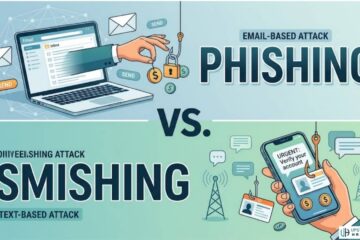
Be deliberate about email security. Standard email is inherently insecure for confidential client communications. Use encrypted email for sensitive project materials where confidentiality genuinely matters. At minimum, verify recipient addresses before sending confidential attachments — smishing and email pretexting attacks frequently impersonate clients to intercept deliverables or redirect payments.
Implement a payment verification protocol. Invoice fraud targeting freelancers — where attackers intercept payment communications and redirect transfers to attacker-controlled accounts — is one of the fastest-growing financial crimes affecting independent workers. Establish a rule: any change to payment details requires verification through a separate, pre-established channel (a video call or a phone call to a known number, not a reply to the same email thread). This single habit mirrors the out-of-band verification that protects enterprises against business email compromise pretexting attacks.
Step 5 — Build Backup and Recovery Into Your Routine
Ransomware works by making your data inaccessible and demanding payment to restore it. The only reliable defense that makes ransomware ineffective is a backup that exists outside the attacker’s reach.
Follow the 3-2-1 backup rule. Maintain three copies of your data — two on different local media (external hard drive plus your working device) and one offsite (encrypted cloud backup). Backblaze offers fully automated, continuous backup for $99 per year. A ransomware attack that encrypts your local drive and connected USB does not reach a separately maintained cloud backup — giving you full recovery without paying a ransom.
Test your recovery process. A backup you have never tested is a backup you cannot trust. Quarterly, restore a sample of files from your backup to verify the process works as expected. This takes fifteen minutes and eliminates the possibility of discovering a broken backup during an actual recovery crisis.
Disconnect external backup drives when not actively backing up. Ransomware frequently encrypts all connected drives during an attack. An external drive that is only connected during scheduled backups is not present during an attack, making it unavailable for encryption.
Understanding how disaster recovery planning works at the organizational level gives freelancers the conceptual framework to apply equivalent principles at individual scale. The principles are identical — redundancy, geographic separation, and tested recovery procedures — adapted to a solo operation rather than an enterprise.
Step 6 — Stay Current With Emerging Threats
The threat landscape freelancers face evolves continuously. Staying current does not require becoming a security professional — it requires a thirty-minute monthly investment in awareness.
Subscribe to cybersecurity news sources that provide practical, non-technical summaries of emerging threats. Specifically, follow threat developments relevant to freelancer attack vectors: new phishing campaign themes, emerging credential stuffing targets, and platform-specific security advisories for the tools you use.
Follow platform security announcements for every marketplace, communication tool, and cloud service you use professionally. Platform security incidents — even those that do not directly expose your data — may indicate that your credentials are at elevated risk and warrant immediate password rotation.
Conduct a quarterly security audit. Review every app with access to your accounts (revoke anything you no longer use), check active sessions on all platforms (log out unrecognized devices immediately), verify your MFA is active on every account, and run a full endpoint security scan. This thirty-minute quarterly habit catches drift — security configurations that degrade over time as apps are added and permissions accumulate.
AI-powered cybersecurity tools now accessible to small operators and freelancers provide continuous monitoring and threat detection at consumer price points that would have required enterprise infrastructure just two years ago. Integrating one of these tools into your security stack provides automated visibility that supplements your manual quarterly review with real-time threat awareness.
For freelancers who handle particularly sensitive data — healthcare, legal, financial services — understanding comprehensive data protection best practices and threat intelligence approaches provides the additional depth required when standard freelancer security hygiene is not sufficient to meet client compliance expectations.
Additionally, maintaining safe online habits across all contexts — including recognizing baiting attacks that use physical media to deliver malware — rounds out a practical security posture that does not depend entirely on technical tools.
For reporting cybercrime incidents affecting your freelance business — including phishing attacks that resulted in financial loss, ransomware infections, or client data breaches — use the FBI’s Internet Crime Complaint Center. Additionally, the FTC’s Small Business Cybersecurity resources provide free, practical guidance specifically written for independent workers and small operators navigating the security requirements that increasingly come with client relationships.
Frequently Asked Questions

What is the most important cybersecurity step a freelancer can take in 2026?
The single highest-impact action is deploying a password manager and generating unique passwords for every account you use professionally. Credential stuffing — where stolen passwords from one breach are tested against other platforms — drove 22% of all data breaches in 2025. A freelancer who reuses passwords across client platforms, payment services, and communication tools is exposed to every breach that has ever affected any of those platforms. A password manager eliminates that exposure entirely. Combine it with authenticator-app MFA on your email account and every financial or client-facing platform, and you eliminate the credential-based attack path that attackers use most often.
Do freelancers need a VPN, and which one should they use?
Yes, specifically when working outside your secured home network. Public and shared WiFi in coffee shops, hotels, coworking spaces, and airports presents a genuine interception risk for unencrypted traffic. A VPN encrypts everything between your device and the VPN server, eliminating that risk. For home use, a VPN is less critical if your home router is properly secured. Choose a provider that publishes independent audit results confirming their no-log policy — Mullvad and ProtonVPN both do. Avoid free VPN services, as many monetize by collecting data, which defeats the privacy purpose entirely. Enable the kill switch feature in whichever VPN you choose — this prevents traffic from leaking in plaintext if the VPN connection drops unexpectedly.
How should freelancers protect client data they store on their devices?
Three layered practices together provide strong protection. First, enable full-disk encryption on your laptop — BitLocker on Windows, FileVault on macOS — so stolen devices cannot be read without your credentials. Second, use cloud storage with strong access controls and MFA for all client files, sharing only what specific collaborators need rather than using broad link-sharing. Third, establish a documented data deletion policy — retain client data only as long as the engagement requires, then delete it securely. Additionally, never store sensitive client data — financial records, personal information, proprietary business materials — in personal consumer cloud accounts that lack business-grade security and auditability. These practices protect your clients and limit your own legal exposure in the event of a breach.
What should a freelancer do if they get hacked or experience a data breach?
Act immediately across four priorities. First, contain the breach — change all account passwords from a separate, clean device, revoke active sessions on every platform, and if ransomware is involved, disconnect all devices from your network immediately to prevent further encryption. Second, assess the scope — determine what data was exposed, which clients may be affected, and what systems were compromised. Third, notify affected clients promptly — most data protection regulations require notification when client personal data has been compromised, and transparency preserves the relationship better than concealment. Fourth, report the incident — file with the FBI IC3 if financial fraud occurred, and with the FTC if consumer data was involved. Document everything throughout this process. Your documentation supports both legal compliance and any insurance claims arising from the incident.
Is cybersecurity knowledge a competitive advantage for freelancers?
Increasingly, yes. Enterprise clients and regulated industries are including vendor security assessments in their freelancer selection process. A freelancer who can demonstrate clear data-handling practices, encrypted communications, MFA-protected accounts, and a documented breach-response protocol is demonstrably lower-risk than one who cannot. As data protection regulations tighten globally — GDPR in Europe, CCPA in California, and sector-specific rules in healthcare and finance — clients face their own compliance obligations around vendor data security. A freelancer who takes security seriously removes a compliance burden from the client relationship. In competitive freelance markets where technical skills are commoditized, professional-grade security practice is a genuine differentiator that commands higher rates and longer client relationships.